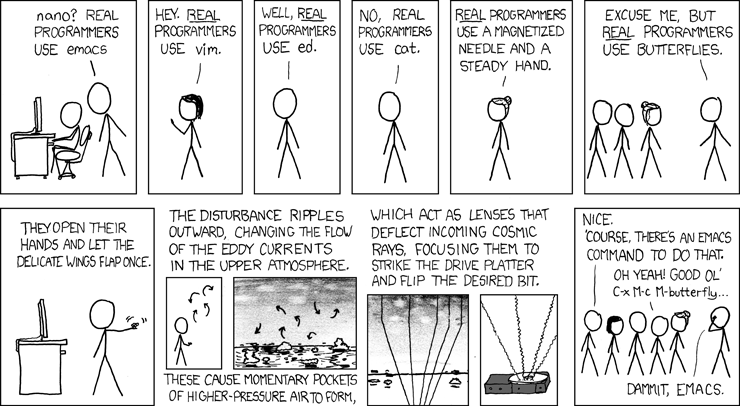
Thanks to Sloth Dog for point this out to me. Yes, I use emacs everyday. I was unaware of the butterfly command though.
Friday, 1 February 2008
M-X butterfly
Posted on 07:20 by Unknown
Thanks to Sloth Dog for point this out to me. Yes, I use emacs everyday. I was unaware of the butterfly command though.
Wednesday, 23 January 2008
Change the DHCP IP Address Range for VMware NAT :: the How-To Geek
Posted on 08:05 by Unknown
I use VM Player to run an instance of the WebLogic and Vignette so I can do my testing. this works fine until I VPN in to work. Fortunately, I came across this posting on how to configure the VM Player to play nice with VPN.
Change the DHCP IP Address Range for VMware NAT :: the How-To Geek
There were a couple of gotchas:
1 - The network manager is not in Start -> Programs -> VMWare section of the program manager. Instead, it will be in the same directory as the VMPlayer which on my box with a standard install is "C:\Program Files\VMware\VMware Player\vmnetcfg.exe". I added a shortcut so I could find it later.
2. Once connected with VPN, do ipconfig /all and look for one with a description matching the VPN client. Using Nortel on my box the description is:
Description . . . . . . . . . . . : Nortel IPSECSHM Adapter - Packet Scheduler Miniport
Use subnet corresponding to the matching IP address as described in the posting.
Change the DHCP IP Address Range for VMware NAT :: the How-To Geek
There were a couple of gotchas:
1 - The network manager is not in Start -> Programs -> VMWare section of the program manager. Instead, it will be in the same directory as the VMPlayer which on my box with a standard install is "C:\Program Files\VMware\VMware Player\vmnetcfg.exe". I added a shortcut so I could find it later.
2. Once connected with VPN, do ipconfig /all and look for one with a description matching the VPN client. Using Nortel on my box the description is:
Description . . . . . . . . . . . : Nortel IPSECSHM Adapter - Packet Scheduler Miniport
Use subnet corresponding to the matching IP address as described in the posting.
Monday, 17 December 2007
Tuesday, 11 December 2007
Emacs Using 100% CPU
Posted on 08:27 by Unknown
Looks like I will be using EMACS more, again. I am getting sick of waiting for my IDE to "help" me by getting in the way, being slow and hogging lots of memory.
I did run into a problem with EMACS hogging the CPU which is fixed by:
Emacs Using 100% CPU: "quick fix is to set the Emacs variable semantic-idle-scheduler-idle-time to a large number (by default it is 2 seconds) so that the idle scheduler does not kick in (which is what is using all the CPU)!"
I did run into a problem with EMACS hogging the CPU which is fixed by:
(custom-set-variables
'(semantic-idle-scheduler-idle-time 200))
Emacs Using 100% CPU: "quick fix is to set the Emacs variable semantic-idle-scheduler-idle-time to a large number (by default it is 2 seconds) so that the idle scheduler does not kick in (which is what is using all the CPU)!"
Thursday, 6 December 2007
Mylyn User Guide - Eclipsepedia
Posted on 12:49 by Unknown
I have been having problems with Mylyn hogging the CPU and making Eclipse unusable. The workaround is to exclude certain parts of the project from being included in Mylyn. I excluded all the generated directories.
Mylyn User Guide - Eclipsepedia: "If an external builder (e.g. Maven, pydev, or other Ant-based builders) is producing output files that are being automatically added to your context because they are not being marked 'derived' as with Eclipse-based builders. You may note that such files are always show as interesting when they are generated or updated and can not be filtered away, since Mylyn expects all files that have changed as part of the task context to have interest. In this case you can explicitly exclude these files from being added to the task context the Preferences -> Mylyn -> Resources page. For example, if the output folder of the builder is 'target', you could set this the following way. Similarly, you could add a filter for '*.pyc' to exclude all files generated with that extension."
Developer's Guide - Google Chart API - Google Code
Posted on 12:39 by Unknown
Developer's Guide - Google Chart API - Google Code: "The Google Chart API lets you dynamically generate charts. To see the Chart API in action, open up a browser window and copy the following URL into it: http://chart.apis.google.com/chart?cht=lc&chs=200x125&chd=s:helloWorld"
Subscribe to:
Posts (Atom)